








































































































This section will help you understand the customer management and keeping track of customer details for quick reference.
- All Customers Review
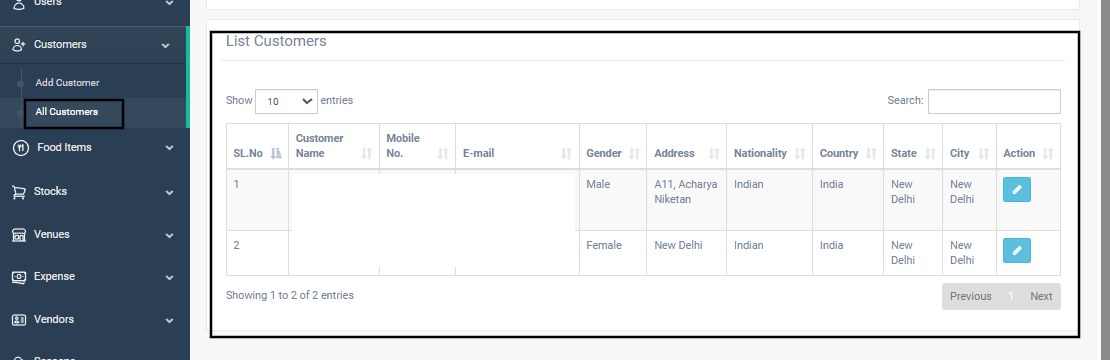
The “List Customers” section displays all customer entries in a searchable and filterable table. This helps staff easily view, update, or manage client data.
Table Columns Explained:
| Column | Description |
| Customer Name | Full name of the customer (first, middle, surname combined). |
| Mobile No. | Primary contact number. |
| Registered email address. | |
| Gender | Gender of the customer. |
| Address | Full address including building/landmark, street, etc. |
| Nationality | National identity, default is “Indian”. |
| Country/State/City | Automatically mapped based on inputs during customer creation. |
| Action | Includes the Edit button to update customer information. |
Use the Search bar to quickly find a customer by name, email, or mobile number.
- Filter Customers
The “Filter Customer” section allows staff to search for specific customers based on multiple fields:
- Full Name
- Mobile No.
- City
- State
- Country
After entering the filter criteria:
- Click “Search” to view matching results.
- Click “Export” to download the filtered customer list in CSV format.

Steps to Add a Customer
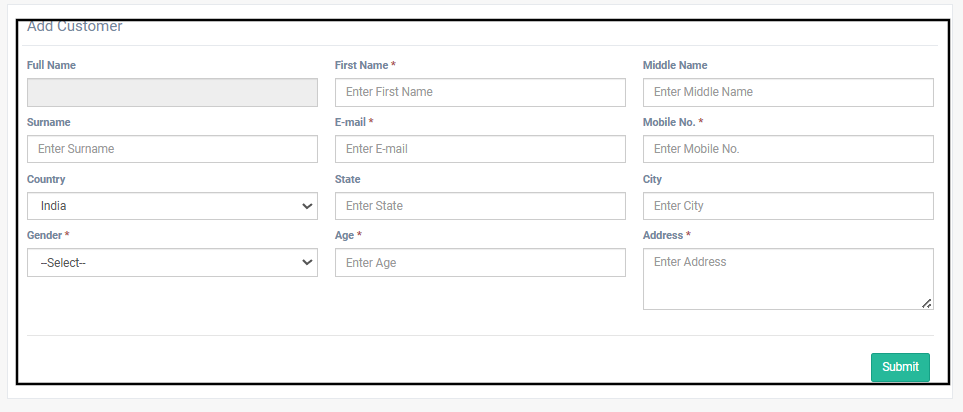
- Navigate to the “Add Customer” form.
- Fill in the required fields:
| Field | Description |
| First Name | Customer’s first name. |
| Middle Name | Optional middle name. |
| Surname | Optional last name. |
| Customer’s valid email address. | |
| Mobile No. | Primary contact number. |
| Gender | Select from dropdown (Male/Female/Other). |
| Age | Enter age (optional). |
| Country | Default: India (can be changed). |
| State | Enter the customer’s state. |
| City | Enter the customer’s city. |
| Address | Full address with locality, area, etc. |
3. Click the “Submit” button to save the customer profile.
The Customer Management Module allows venue staff to maintain a detailed and organized list of customers. Staff can:
- Easily add or update customer details
- Use filters to quickly find existing customers
- Export customer lists for reporting or record-keeping
This feature ensures efficient guest handling and helps streamline the booking and communication process.